1. Introduction
AdNauseam is an independent project: a claims platform for travel and medical insurance that I designed and built on my own. It follows a claim from the first phone call to the payment, and brings the paper, fax and spreadsheet work around it into one clean, fast workspace for examiners.
This page covers the problems it is built around, what it does better than the usual way of working, and the design decisions an insurer would care about.
2. The Problem
2.1 How Claims Work Today
A travel medical claim rarely arrives complete. Most start as a phone call to emergency assistance from someone abroad who may not have their policy number or their bills, and who may hang up partway. The file still has to be opened, and someone has to fill the gaps before it reaches claims.
Much of the work around that file still runs on tools that weren’t built for it:
- Claims arrive on paper, by email and by phone, often incomplete, and are keyed in by hand.
- Verifications of benefits and medical records requests go to providers by fax, typed up for each file.
- Bills from foreign providers, in other currencies, are often repriced through a provider network and tracked in spreadsheets until they are paid.
- Each insurer’s rules, such as which documents it needs and how much an examiner may pay before a manager signs off, are written in guidelines and checked by hand.
- Missing documents are chased by email, and the replies are filed by hand.
- Where there is a claims system, it is often older software built around data entry, with the checks and the paperwork happening around it rather than in it.
When this work lives in paper files, inboxes and spreadsheets, there is no reliable record of who did what, and the checks that protect the insurer’s money depend on an examiner remembering them on a busy day.
2.2 Why It Matters to an Insurer
Mistakes here are expensive. Money goes out that shouldn’t, an insurer’s rule is broken and has to be explained, or a file sits open while the claimant waits for a follow-up nobody sent. AdNauseam is built so the system, not the examiner’s memory, carries those checks, and so every step leaves a record.
3. What AdNauseam Does Better
3.1 One Workspace Instead of a Paper File
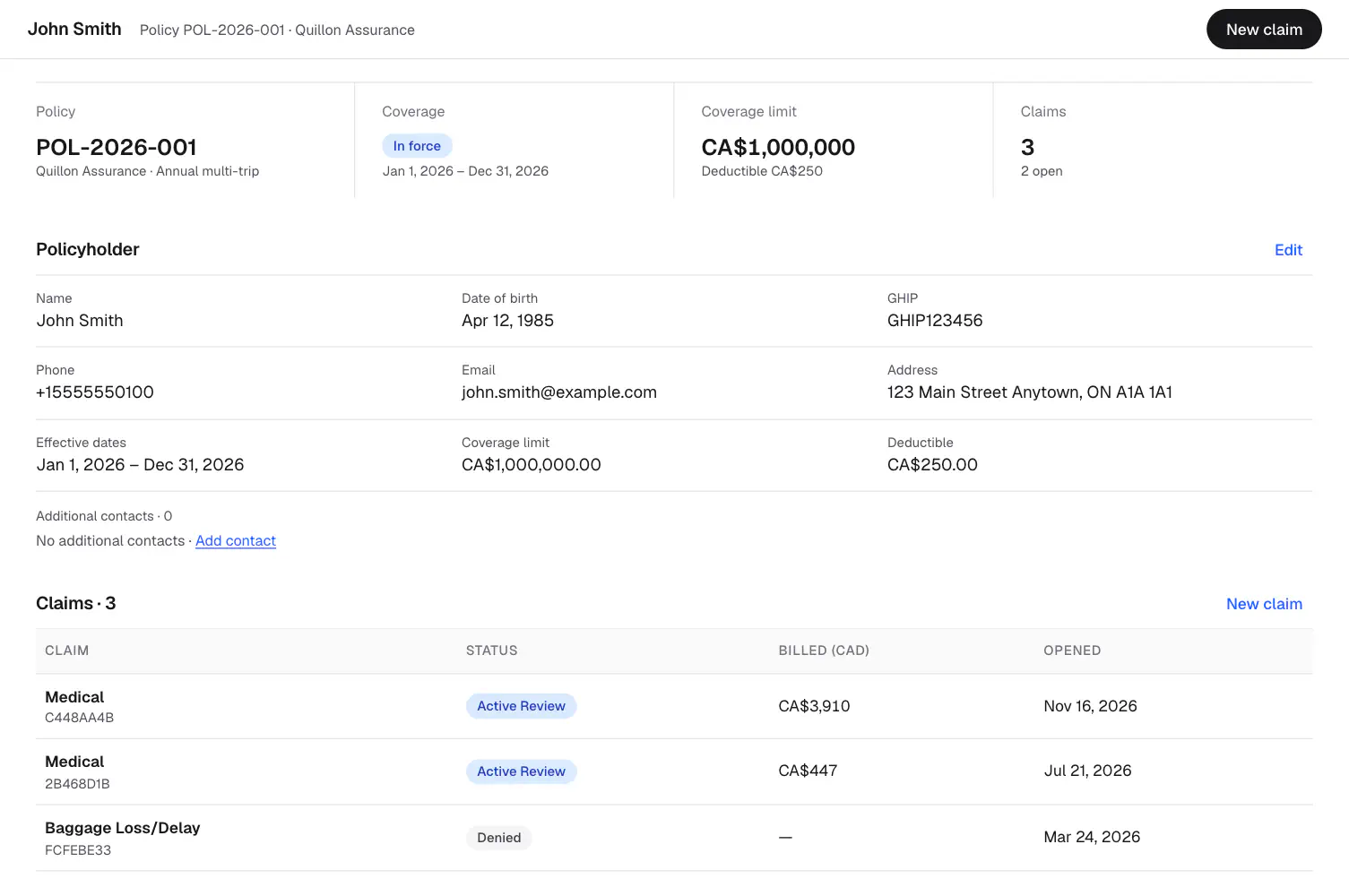
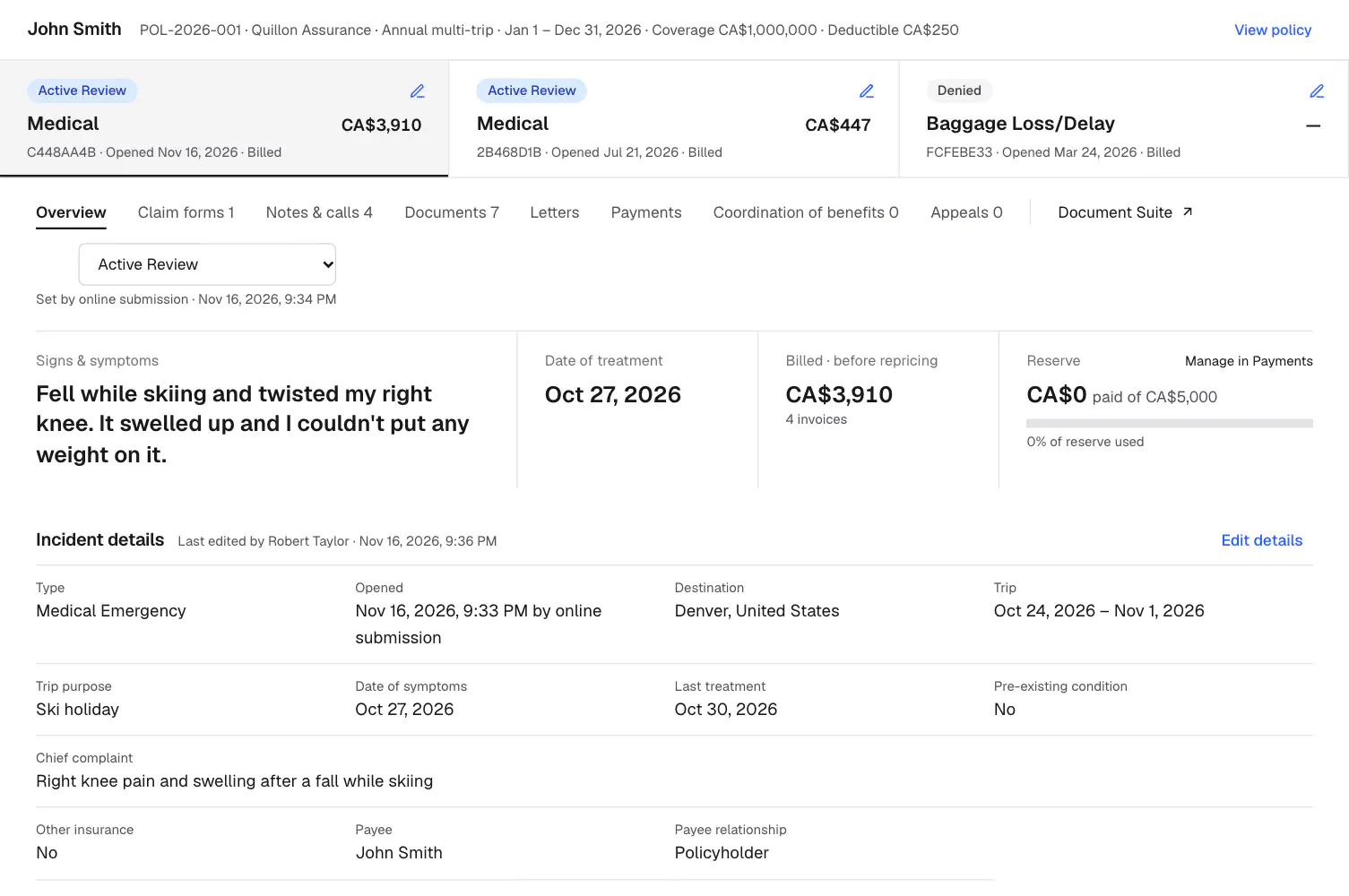
Every claim on a policy sits on one page: the policyholder’s coverage and deductible across the top, the policy’s claims in a grid, and the claim’s forms, notes and calls, documents, letters and payments in tabs underneath. Nothing lives in a separate spreadsheet or shared drive, and each part of the claim shows who last changed it and when.
3.2 A Claim Form Claimants Can Finish on Their Own
Most claims start with a claimant at home after the trip, holding a pile of foreign bills. The online claim form asks one plain question per screen. It finds the policy, checks the claimant’s last name and date of birth against it, and asks only the questions that fit the type of claim. Answers save as the claimant goes, so they can stop and come back later.
The claimant describes each bill beside a preview of it: who it is from, the date, the total in the bill’s own currency and what their card was charged in Canadian dollars. The form then lists the documents this insurer needs for this claim, worked out from the insurer’s thresholds and the claim’s dates. The claimant can upload each one, or say they’ll send it later and see the deadline for it.
At the end the claimant checks every answer on one page and signs in the browser, drawn or typed, under a statement of what they are confirming. The signed form is archived as it was sent, with a PDF in the claim’s documents, and the claim reaches the examiner complete instead of as paper to key in.
3.3 Intake Without the Paperwork
Emergency assistance staff open the claim during the call, leave anything they don’t know yet for later, and pick it up where they stopped. Staff never sign for the claimant; the claimant checks and signs the same form later through a private link. When documents are missing, the examiner sends a private upload link instead of a follow-up email, and the files land straight in the claim.
3.4 Invoices Entered Beside the Bill
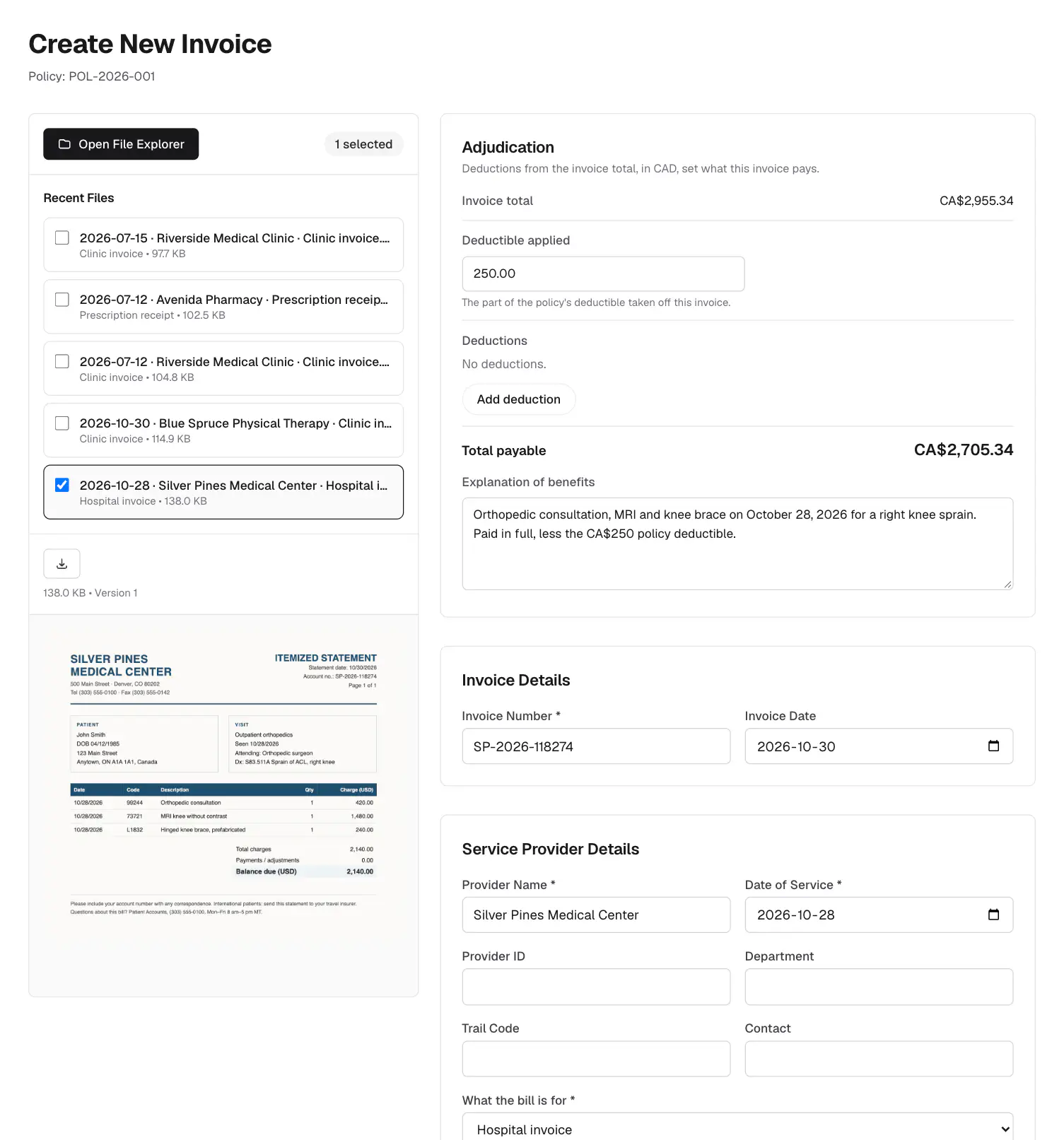
The examiner enters an invoice beside the document it comes from, instead of moving between a scanned bill and a separate entry screen. The adjudication shows how the payable amount is reached, from the amount billed or repriced, less the deductible and anything ineligible.
3.5 Letters From the Record, Not Retyped
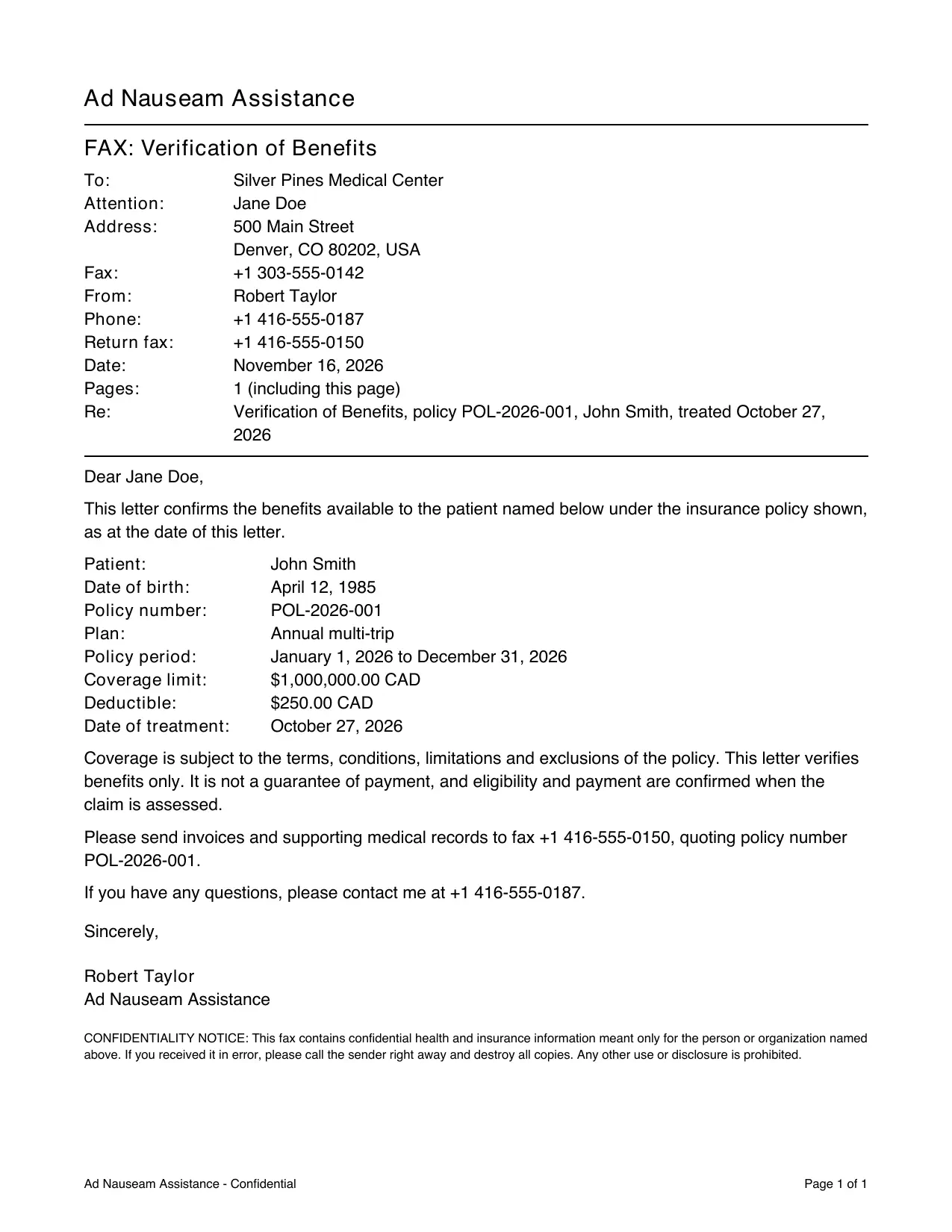
Verifications of benefits, medical records requests and explanations of benefits are written from the claim. The policy and coverage details are read from the record rather than typed, so a letter can’t disagree with the file. The examiner checks the preview, files the letter to the claim and downloads a fax-ready PDF.
3.6 Checks Before Money Moves
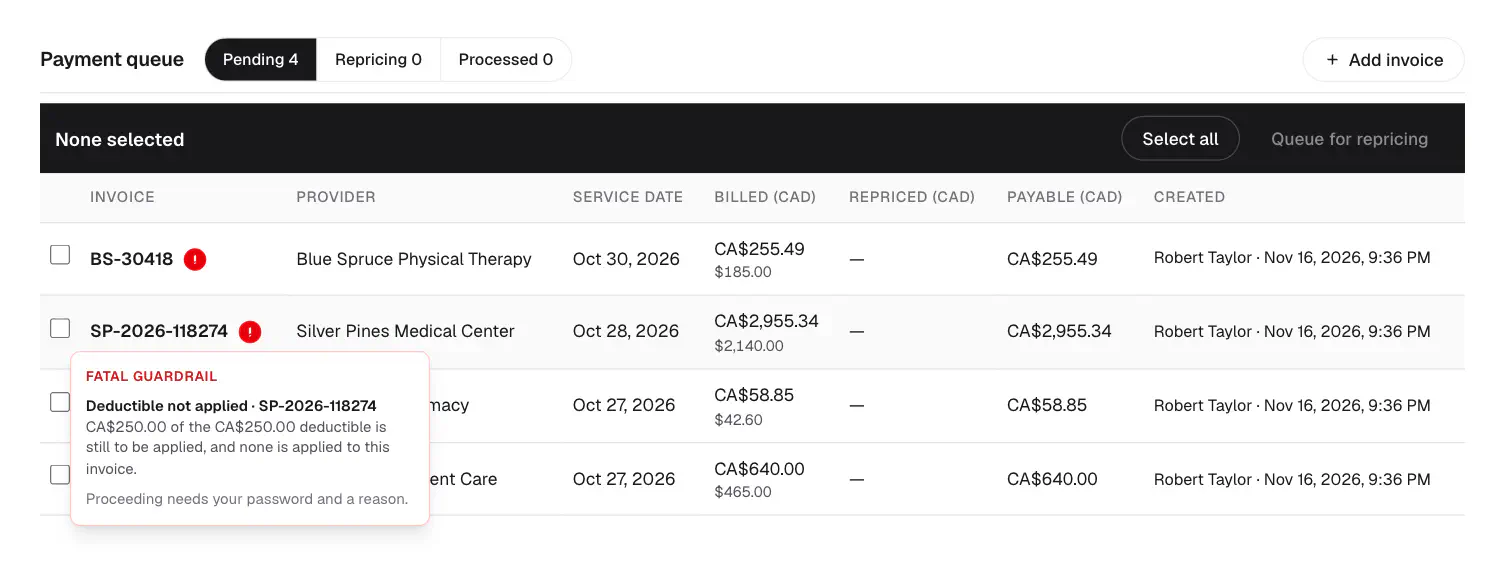
Invoices move through a payment queue, from pending, through repricing, to paid, and each move records who made it. Before money moves, the system checks each invoice against the policy and the insurer’s rules. Some problems block payment outright, some need the examiner to confirm with a reason, and a payment over the examiner’s authority needs a manager.
4. A Modern Interface for Examiners
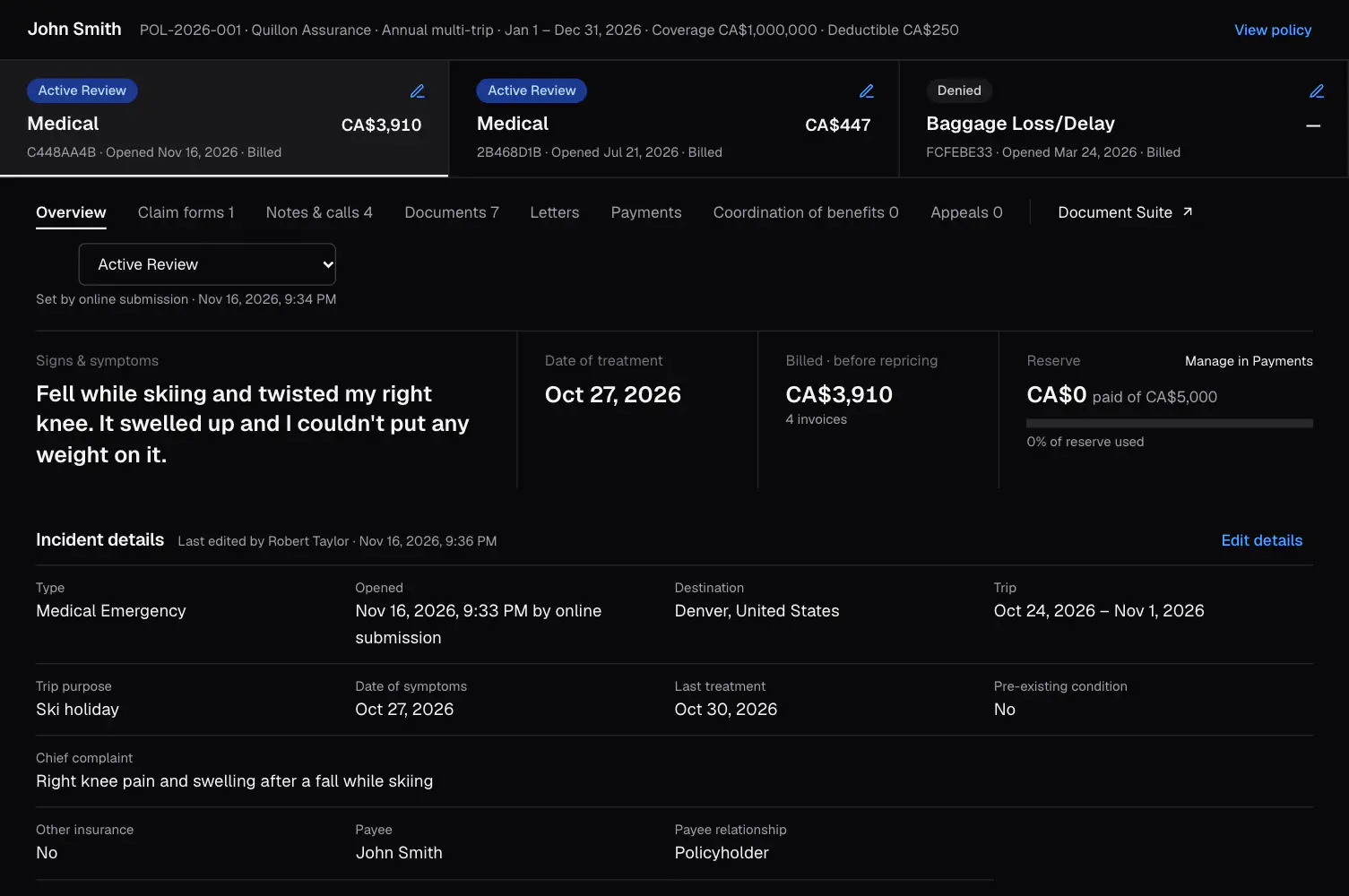
Examiners spend their whole day in their claims system, so AdNauseam is designed to be clean, fast and focused. Every policy uses the same layout, and the claim’s details sit together on one screen rather than spread across several. The workspace loads a policy once and keeps it as the examiner moves between tabs. The palette is mostly black and white, so a claim’s status and any error stand out. It works in light and dark mode.
5. Design Decisions an Insurer Cares About
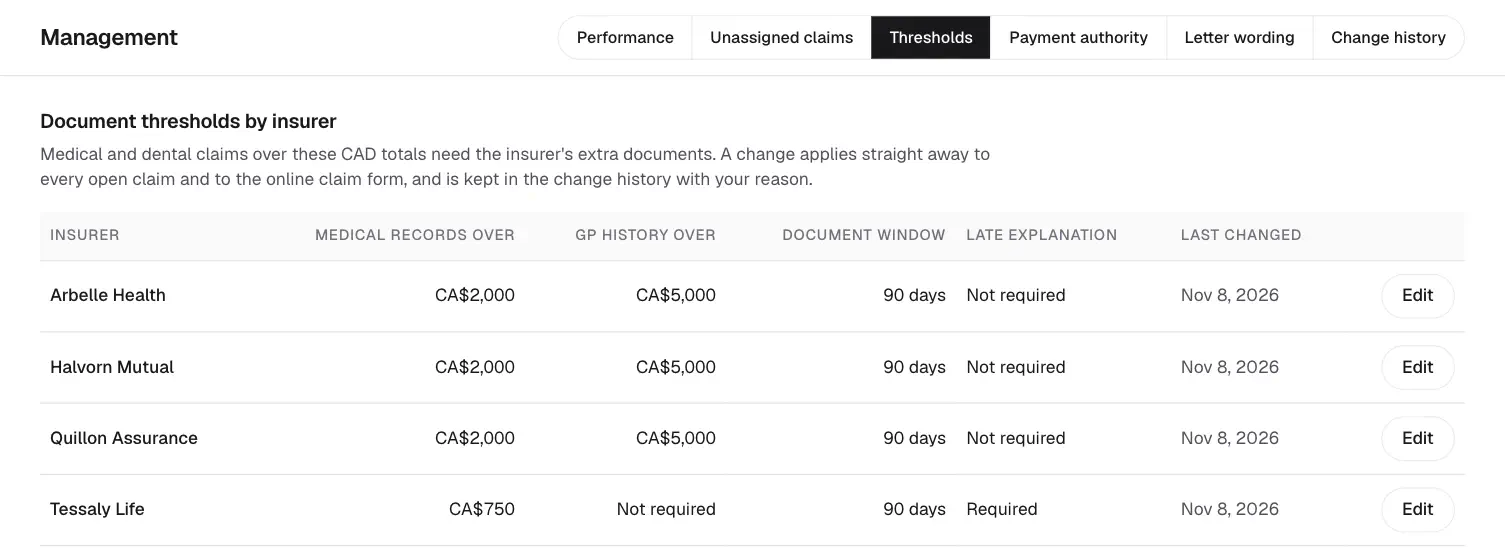
- Payment authority and thresholds are settings, not code. Managers change each insurer’s document thresholds, each person’s payment authority and the wording of every letter on a dashboard, and every change is logged with a reason.
- A full record of who did what. The server attributes every change to the signed-in staff member, and the activity log can only be added to. Claims and invoices can’t be deleted, and notes can’t be rewritten.
- Claim forms are an untouched archive. Every form is kept exactly as it was sent. A claimant’s correction changes the claim only when staff review it and apply it.
- An appeal never silently changes a claim. The decision is recorded, and reopening the claim is a deliberate step, with a reason, that is logged like any other override.
- Recoveries from other insurers are report-only. They are recorded and reported, but money only moves through the payment queue, where the checks are.
- Only signed-in staff can use it. The only public pages are the claimant’s own forms and upload link, and each checks the claimant’s identity and limits repeated attempts.
6. Outcomes
Managers get a month-end report for each insurance client as an Excel workbook, with claims by type, open claims, payments and invoices ready to pay, and no claimant or staff names. The dashboard behind it tracks how long claims stay open, how long decisions and requested documents take, what was paid and saved through repricing, and how often the checks were overridden.
7. Stack
AdNauseam is a Django and PostgreSQL back end with a Next.js and TypeScript front end, in light and dark mode, run with Docker. Letters and claim forms are drawn as PDFs by a small writer I built on the standard library, so there is no PDF library or Word template to maintain. The code is private, but it’s available on request, and I’m happy to walk through it live.
8. Get in Touch
If you work in claims, product or operations and want to talk about how this could fit your team, message me on LinkedIn.